GCP-112:Firestore 入門——NoSQL 文件資料庫完全指南
前言
應用需要一個不用管 schema、能即時同步、手機還能離線用的資料庫嗎?這種情境,Firestore 很適合。
這是 GCP 核心服務系列的第 7 課,我們來把 Firestore 的核心概念和實際操作搞懂。
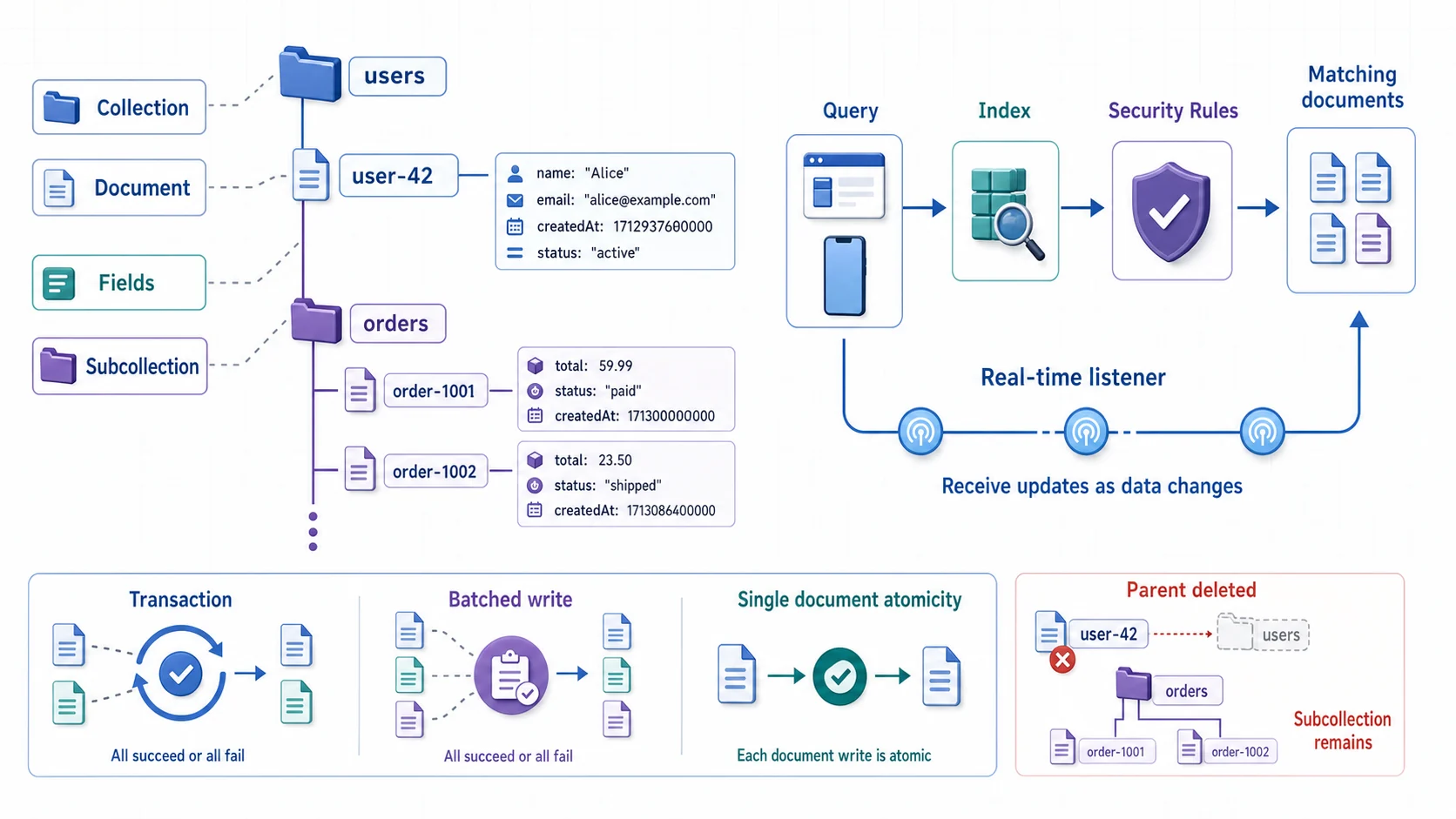
Firestore 的階層固定是 Collection → Document → Subcollection,文件才承載欄位。查詢與即時監聽都受 Security Rules 約束,複合查詢通常需要對應 Index。Transaction 與 Batched write 能把多筆變更當成一個原子操作;但刪除父 Document 不會自動刪除底下的 Subcollection,清理責任要另外設計。
什麼是 Firestore?
Firestore 是 GCP 的 NoSQL 文件資料庫(Document Database),資料以 JSON-like 文件形式儲存:
流程圖暫時無法顯示,請重新整理頁面後再試。
Firestore 路徑必須以 Collection 與 Document 交替;只有 Document 承載欄位。Subcollection 是獨立資料集合,刪除父 Document 不會連帶刪除它,資料模型必須包含遞迴清理策略。
Firestore 是 Cloud Datastore 的下一代。原本的 Datastore 已經不是獨立產品了,現在改以 Firestore in Datastore mode 的形式繼續活著。
Native Mode vs Datastore Mode
建立 Firestore 資料庫時,你必須選擇模式:
| 特性 | Native Mode | Datastore Mode |
|---|---|---|
| API | Firestore API | Datastore API |
| 即時同步 | 支援 | 不支援 |
| 離線支援 | 支援(Mobile/Web SDK) | 不支援 |
| 強一致性 | 全面強一致性 | 全面強一致性 |
| 適合場景 | Mobile/Web 應用 | 伺服器端應用 |
| App Engine 整合 | 需要手動設定 | 原生整合 |
強一致性(strong consistency)的意思是:你寫進去一筆資料,下一秒不管從哪台機器讀,讀到的一定是最新的值,不會出現「剛改完卻讀到舊資料」的情況。兩種模式都做得到。
能切換嗎?
只有資料庫是空的時候才能切換模式。一旦寫進去任何資料,模式就鎖死了。
建議
- 新專案一律選 Native Mode——功能更完整
- 只有既有 Datastore 應用才需要用 Datastore Mode
💡 重點提點
模式一旦有資料寫進去就改不了,沒有「之後再轉」這回事——要轉只能開一個新資料庫重新匯入。所以建立時就要想清楚。新手記一句口訣就好:不確定就選 Native Mode,它涵蓋了即時同步、離線,幾乎所有新應用都用得到。

建資料庫時就得在這裡定生死——原生模式(Native)對上 與 Datastore 相容(Datastore mode) 。上面提點框說過:一旦寫進資料,模式就鎖死、改不了,所以不確定就選 Native。順帶一提,選 Native 時下面會冒出安全性規則的初始設定——「限定」是預設拒絕(安全),「開啟」則是 30 天全開的測試模式,正式資料千萬別選它。
流程圖暫時無法顯示,請重新整理頁面後再試。
模式不是可以日後隨意切換的功能開關。除非明確承接 Datastore 應用,否則新專案選 Native Mode;第一筆資料寫入前,應再次確認 SDK、即時功能與遷移需求。
資料模型核心概念
文件(Document)
文件是 Firestore 的基本單位,類似 JSON 物件:
# Python 範例:新增文件
from google.cloud import firestore

db = firestore.Client()

# 自動生成 ID
doc_ref = db.collection("users").document()
doc_ref.set({
    "name": "Bobo",
    "email": "bobo@example.com",
    "age": 30,
    "tags": ["gcp", "cloud"],
    "address": {
        "city": "Taipei",
        "country": "Taiwan"
    }
})

# 指定 ID
db.collection("users").document("user-001").set({
    "name": "Alice"
})
重要限制
| 項目 | 限制 |
|---|---|
| 文件大小上限 | 1 MiB(1,048,576 bytes) |
| 欄位值大小上限 | 1 MiB - 89 bytes |
| 子集合巢狀深度 | 100 層 |
| 文件名稱大小 | 6 KiB |
| Map/Array 巢狀深度 | 20 層 |
這裡的「文件名稱大小 6 KiB」指的是整段完整路徑(例如 users/user-001/orders/order-001)的上限,不要跟單一文件 ID(你自己取或自動生成的那一小段,上限 1,500 bytes)搞混。一般情況根本碰不到,路徑取名別太誇張就好。
集合(Collection)
集合是放文件的容器,不用事先建好。寫進第一個文件時它自動冒出來,刪掉最後一個文件時又自動消失。
子集合(Subcollection)
文件可以包含子集合,用來建立層級關係:
# 在 user-001 下建立 orders 子集合
db.collection("users").document("user-001") \
  .collection("orders").document("order-001").set({
    "item": "Cloud certification",
    "amount": 200
})流程圖暫時無法顯示,請重新整理頁面後再試。
Firestore 沒有 JOIN,也不會替你維護父子生命週期。資料是否一起讀取、會不會無上限成長、是否要跨父項查詢,比「看起來像樹狀」更能決定要嵌入、建 Subcollection 或使用頂層 Collection。
CRUD 操作
讀取
# 讀取單一文件
doc = db.collection("users").document("user-001").get()
if doc.exists:
    print(doc.to_dict())

# 查詢
query = db.collection("users") \
    .where("age", ">=", 25) \
    .where("tags", "array_contains", "gcp") \
    .order_by("age") \
    .limit(10)

for doc in query.stream():
    print(f"{doc.id}: {doc.to_dict()}")
更新
# 更新特定欄位(不影響其他欄位)
db.collection("users").document("user-001").update({
    "age": 31,
    "address.city": "Kaohsiung"  # 更新巢狀欄位
})
刪除
# 刪除文件
db.collection("users").document("user-001").delete()

# 刪除特定欄位
db.collection("users").document("user-001").update({
    "age": firestore.DELETE_FIELD
})
批次與交易
# 批次寫入(現已無 500 筆上限,改受單次提交約 10 MiB 大小限制;舊版曾限制 500 筆)
batch = db.batch()
for i in range(100):
    ref = db.collection("items").document(f"item-{i}")
    batch.set(ref, {"value": i})
batch.commit()

# 交易(讀取 + 寫入的原子操作)
@firestore.transactional
def transfer(transaction, from_ref, to_ref, amount):
    from_doc = from_ref.get(transaction=transaction)
    to_doc = to_ref.get(transaction=transaction)

    from_balance = from_doc.get("balance") - amount
    to_balance = to_doc.get("balance") + amount

    transaction.update(from_ref, {"balance": from_balance})
    transaction.update(to_ref, {"balance": to_balance})

transaction = db.transaction()
transfer(transaction,
         db.collection("accounts").document("A"),
         db.collection("accounts").document("B"),
100)流程圖暫時無法顯示,請重新整理頁面後再試。
Batch 適合「已知道要寫什麼」的多筆原子變更;Transaction 適合「必須先讀目前狀態才能決定新值」。Transaction 可能重跑,因此外部副作用不能直接放在交易函式裡。
即時監聽(Real-time Listeners)
Native Mode 的獨家功能,資料變更時自動推送通知:
# 監聽單一文件
def on_snapshot(doc_snapshot, changes, read_time):
    for doc in doc_snapshot:
        print(f"Changed: {doc.to_dict()}")

doc_ref = db.collection("users").document("user-001")
doc_watch = doc_ref.on_snapshot(on_snapshot)

# 監聽查詢結果
query_ref = db.collection("users").where("age", ">=", 25)
query_watch = query_ref.on_snapshot(on_snapshot)

# 停止監聽
doc_watch.unsubscribe()
背後怎麼運作不用太在意——你只要知道:用戶端「訂閱」了某筆資料或某個查詢之後,只要結果有變動,Firestore 就會主動把新資料推過來,你不用自己一直去輪詢(polling)。
索引設計
自動索引
Firestore 會幫每個欄位自動建好單欄位索引,基本的等式和範圍查詢都罩得住。
複合索引
複合索引(composite index)就是把「好幾個欄位綁在一起」建的索引。當你的查詢同時用到多個欄位(例如又篩 age、又排序 name),單欄位索引不夠用,就得手動建一個複合索引:
# 這個查詢需要複合索引:(age ASC, name ASC)
query = db.collection("users") \
    .where("age", ">=", 25) \
    .order_by("age") \
    .order_by("name")
# 建立複合索引
gcloud firestore indexes composite create \
--collection-group=users \
--field-config=field-path=age,order=ascending \
--field-config=field-path=name,order=ascending索引限制
| 項目 | 限制 |
|---|---|
| 複合索引數量(無帳單) | 200 |
| 複合索引數量(有帳單) | 1,000 |
| 單一文件的索引項目數 | 40,000 |
| 複合索引最大欄位數 | 100 |
流程圖暫時無法顯示,請重新整理頁面後再試。
Firestore 不是「沒有索引也能掃完整集合」的資料庫;可執行的查詢必須有對應索引。先由應用查詢反推索引,不要為所有欄位組合預建 Composite Index,否則會增加寫入與儲存成本。
安全規則 vs IAM
安全規則(Security Rules)
用於 Mobile/Web 用戶端的存取控制:
// firestore.rules
rules_version = '2';
service cloud.firestore {
  match /databases/{database}/documents {
    // 用戶只能讀寫自己的資料
    match /users/{userId} {
      allow read, write: if request.auth != null
                         && request.auth.uid == userId;
    }

    // 公開讀取,只有管理員能寫入
    match /posts/{postId} {
      allow read: if true;
      allow write: if request.auth.token.admin == true;
    }
  }
}
IAM
用於伺服器端的存取控制:
# 授予 Service Account Firestore 讀寫權限
gcloud projects add-iam-policy-binding my-project \
  --member="serviceAccount:my-sa@my-project.iam.gserviceaccount.com" \
  --role="roles/datastore.user"
何時用哪個?
流程圖暫時無法顯示,請重新整理頁面後再試。
Security Rules 與 IAM 不是互相替代:它們保護不同呼叫路徑。用戶端直連要把使用者層級條件寫進 Rules;伺服器端則以 Service Account 和 IAM 進入,再由後端程式執行業務授權。
Firestore Editions
| 特性 | Standard | Enterprise |
|---|---|---|
| 基本 CRUD | 支援 | 支援 |
| 即時同步 | 支援 | 支援 |
| 備份 | 標準備份 | 標準備份 |
| PITR(時間點還原) | 7 天 | 7 天 |
| 向量搜尋 | 支援 | 支援 |
| 全文搜尋 | 不支援 | 支援 |
| MongoDB 相容 | 不支援 | 支援 |

版本選擇對應上面那張 Editions 表。Standard 就是一般用的簡易查詢引擎; Enterprise 多了全文搜尋跟 MongoDB 相容,需要那兩個功能才升上去。右邊費用摘要會隨版本即時換算——Standard 的讀寫單價比較好抓成本。
多資料庫支援
Firestore 支援在同一個專案中建立多個資料庫(Named Databases):
# 建立額外的資料庫
gcloud firestore databases create \
  --database=analytics-db \
  --location=asia-east1 \
  --type=firestore-native
# 連線到特定資料庫
db = firestore.Client(database="analytics-db")💡 重點提點
只有預設資料庫(名稱固定是
(default))享有每日免費層額度。你後來自己建的那些 Named Database(像上面的analytics-db)一律不享免費額度,從第一次讀寫就開始計費。新手最容易在這裡踩坑——以為「反正都在免費層內」,結果帳單冒出一筆莫名其妙的費用。練習、學習階段,盡量把東西放在(default)就好。
流程圖暫時無法顯示,請重新整理頁面後再試。
Edition 決定查詢引擎與相容能力,Database 名稱則決定隔離與免費額度。多資料庫不是免費的
namespace;只有 (default) 享有每日免費層,每個 Named Database 都要獨立治理與估算成本。
TTL(自動過期刪除)
Firestore TTL 讓你指定欄位作為過期時間,文件到期後自動刪除:
# 設定 TTL 欄位
gcloud firestore fields ttls update expiresAt \
  --collection-group=sessions \
  --enable-ttl
from datetime import datetime, timedelta
# 建立 30 天後自動過期的文件
db.collection("sessions").add({
"userId": "user-001",
"expiresAt": datetime.now() + timedelta(days=30)
})定價與免費層
免費層(每天,僅限預設資料庫)
| 項目 | 免費額度 |
|---|---|
| 文件讀取 | 50,000 次/天 |
| 文件寫入 | 20,000 次/天 |
| 文件刪除 | 20,000 次/天 |
| 儲存空間 | 1 GiB |
| 對外流量 | 10 GiB/月 |
超過免費層(美國區域)
| 項目 | 費用 |
|---|---|
| 文件讀取 | $0.03 / 100,000 次 |
| 文件寫入 | $0.09 / 100,000 次 |
| 文件刪除 | $0.01 / 100,000 次 |
| 儲存空間 | $0.15 / GiB / 月 |
Firestore vs Cloud SQL vs Bigtable
ACE 考試最常考的 NoSQL 選型題:
| 特性 | Firestore | Cloud SQL | Bigtable |
|---|---|---|---|
| 類型 | 文件型 NoSQL | 關聯式 SQL | 寬列型 NoSQL |
| 資料模型 | JSON 文件 | 表格(Row/Column) | Key-Value 寬列 |
| 查詢語言 | Firestore Query | SQL | Row Key Scan |
| 擴展性 | 自動水平擴展 | 垂直擴展 + 讀取複本 | 自動水平擴展 |
| 單筆大小 | 1 MiB | 依欄位定義 | 10 MB/cell、100 MB/row |
| 免費層 | 50K 讀/天 | 無 | 無 |
| 最適合 | Mobile/Web App | 交易型系統 | 時序/IoT/分析 |
選型公式
流程圖暫時無法顯示,請重新整理頁面後再試。
NoSQL 不是單一類型。Firestore 解決應用文件與即時同步,Bigtable 解決以 Row Key 為中心的大規模高吞吐存取;一旦需求核心是 JOIN、關聯完整性與 SQL 交易,就應優先選 Cloud SQL。
ACE 考試重點整理
必背知識點
- Firestore 有兩種模式:Native(推薦)和 Datastore,只有空資料庫能切換
- 文件大小上限 1 MiB,子集合深度上限 100 層
- 即時監聽是 Native Mode 獨有功能
- 安全規則用於 Mobile/Web,IAM 用於伺服器端
- 免費層:50K 讀取/天、20K 寫入/天
- 多資料庫支援:同一專案可建立多個資料庫
- 自動索引:單欄位自動建索引,多欄位需手動建複合索引
常見陷阱題
Q:Firestore 和 Datastore 是兩個不同的產品嗎? A:不是。Datastore 已經併入 Firestore,以 Firestore in Datastore mode 的形式存在。新專案請選 Native Mode。
Q:Firestore 適合儲存 10 MB 的檔案嗎? A:不適合。文件大小上限 1 MiB。大型檔案應存在 Cloud Storage,Firestore 只存 metadata 和 GCS 路徑。
Q:Mobile App 直接存取 Firestore,要用 IAM 還是 Security Rules? A:Security Rules。IAM 用於伺服器端,Security Rules 才能做到用戶級別的存取控制。
Q:需要即時同步資料給多個用戶端,用什麼服務? A:**Firestore(Native Mode)**的即時監聽功能。
總結
說到底,Firestore 就是那種「不想煩 schema、要即時同步、手機還能離線」時最順手的選擇。考試上你只要記牢幾件事就夠用:新專案一律 Native Mode、只有空庫能換模式、即時監聽是 Native 獨有、Mobile/Web 用 Security Rules 而 Server 端用 IAM,還有那個最會吃帳單的坑——免費額度只認 (default) 這個預設資料庫。
下一課 GCP-113:Bigtable 深度解析,來看 Google 那套 PB 級的寬列型 NoSQL 資料庫。
資料庫選型系列
| 課程 | 服務 | 適合場景 |
|---|---|---|
| GCP-108 | Cloud SQL | 中小型 OLTP、傳統 SQL 應用 |
| 本課 GCP-112 | Firestore | Mobile/Web App、即時同步 |
| GCP-113 | Bigtable | PB 級 IoT/時序、低延遲高吞吐 |
| ACE-211 | BigQuery | PB 級分析、BI 報表 |
| ACE-213 | Spanner | 全球規模 OLTP、強一致性 |
| GCP-115 | Memorystore | 微秒級快取、Session 管理 |
📖 完整比較:想一次看懂所有資料庫差異?參考 GCP 資料庫選型完全指南。
相關文章
您可能也會對這些文章感興趣
GCP-112:Firestore 入門——NoSQL 文件資料庫完全指南
完整學習 Google Cloud Firestore,涵蓋 Native mode vs Datastore mode、資料模型設計、即時監聽、安全規則、定價與免費層,以及 ACE 考試必考的 NoSQL 資料庫選型知識。
GCP-113:Cloud Bigtable 入門——PB 級寬列 NoSQL 資料庫完全指南
完整學習 Google Cloud Bigtable,涵蓋 SSD vs HDD 選型、Row Key 設計、Column Family、垃圾回收策略、複製叢集、自動擴縮、Change Streams,以及 ACE 考試必考的 NoSQL...
GCP-108:Cloud SQL 入門——托管關聯式資料庫完全指南
深入了解 Google Cloud SQL 托管關聯式資料庫服務,涵蓋 MySQL、PostgreSQL、SQL Server 支援版本、高可用架構、連線方式、備份策略,以及 ACE 考試必考知識點。