ACE-210:GCP 負載均衡深度解析——ALB、CDN 與 Cloud Armor 完全指南

前言
流量進到你的 GCP 系統,第一道門就是負載均衡器。流量怎麼分、SSL 在哪終止、要不要快取、怎麼擋攻擊,都是它在管。搞懂 GCP 的負載均衡架構,不只是 ACE 考試的核心考點,要設計高可用系統也少不了它。
這篇是 ACE 進階系列第 5 課,我們先從產品改名講起,再把整套 GCP 負載均衡體系過一遍。
先備知識:這課假設你已經知道 MIG(Managed Instance Group,托管執行個體群組)、health check、VPC、Cloud Run 大概是什麼。如果這幾個還很陌生,建議先回去把前面 Compute / MIG 那幾課的觀念補一下,再回來看負載均衡會順很多。
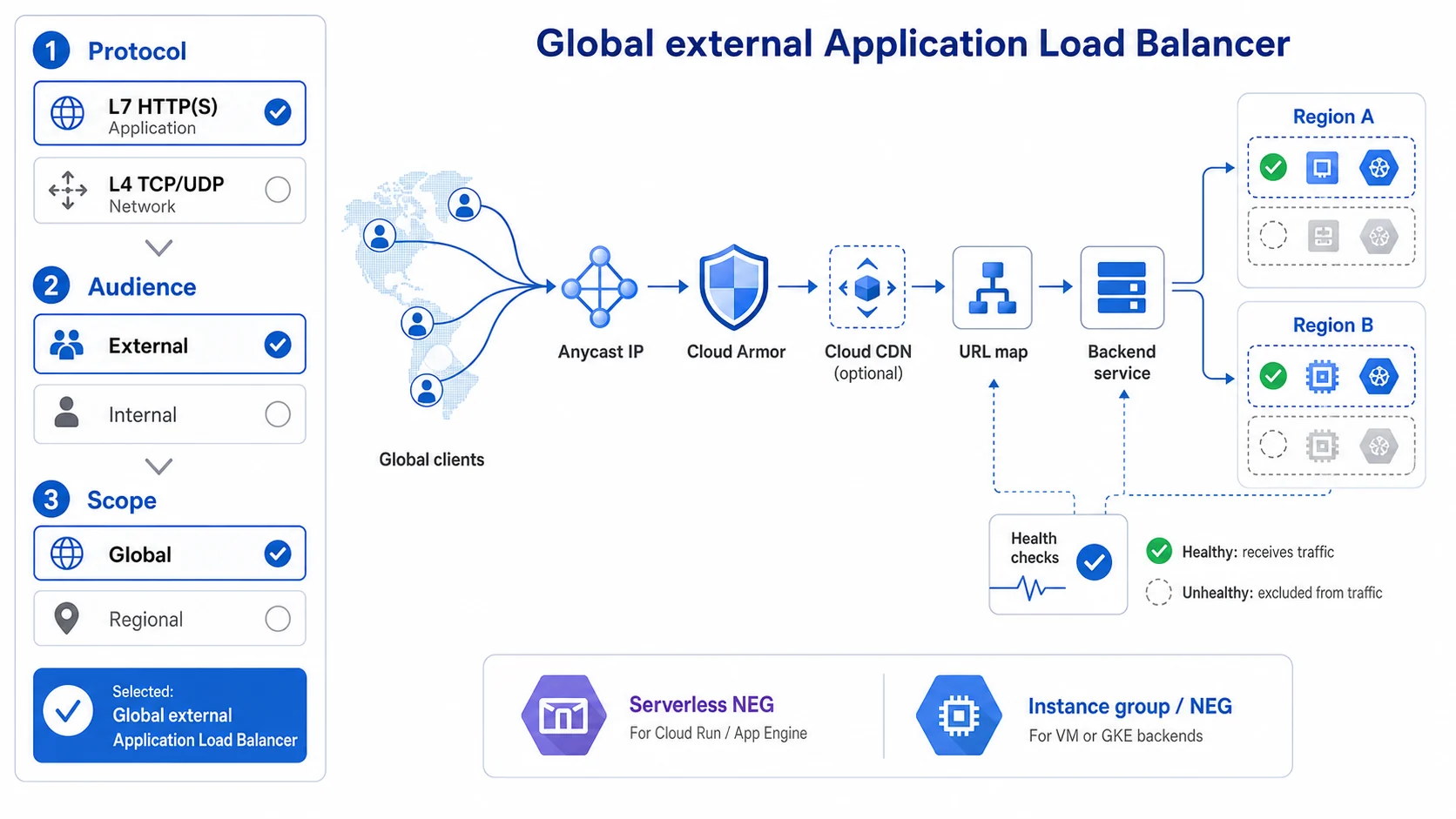
選型先固定三軸:協定層級、對外或內部、全域或區域;右側只是其中一格「Global external ALB」的概念路徑。Cloud Armor 保護入口、CDN 是選配快取、URL map 做 L7 路由,health checks 則獨立決定後端能不能接流量。後端類型還要分清 Serverless NEG 與 VM/GKE 使用的 instance group 或 NEG。
命名更新
GCP 的負載均衡器分兩大類,先把這條主線記牢,後面的命名才不會亂:
- ALB(Application Load Balancer,應用程式負載均衡器)——工作在 L7(看得懂 HTTP/HTTPS/gRPC),可以依網址路徑、Host、Header 路由,是最常用的一種。
- NLB(Network Load Balancer,網路負載均衡器)——工作在 L4(只看 TCP/UDP),不理會 HTTP 內容。
NLB 底下還要再分兩種,這是初學者最容易混的地方,差別只有一句話:
- Proxy NLB——會終止連線再幫你轉發,所以後端看到的來源 IP 是 LB 的 IP;可以做 TCP(選配 SSL offload)。
- Passthrough NLB——封包直通過去、不做 proxy,所以後端能看到原始來源 IP;永遠是區域級(regional)。
⚠️ 重要:Google 從 2023 年起陸續把負載均衡器改名,向業界標準看齊。考試兩套名稱都可能出現,新舊都得認得。要特別注意:舊的 SSL Proxy LB 已經併進 Proxy Network Load Balancer(變成「TCP + 選配 SSL offload」),考古題如果還寫 SSL Proxy,對應的就是現在的 Proxy NLB。
| 新名稱 | 舊名稱 | 層級 | 範圍 |
|---|---|---|---|
| Application Load Balancer (ALB) | HTTP(S) Load Balancer | L7 | Global / Regional |
| Proxy Network Load Balancer | TCP Proxy / SSL Proxy LB | L4 | Global / Regional |
| Passthrough Network Load Balancer | External TCP/UDP Network LB | L4 | Regional(永遠區域級) |
| Internal Application LB | Internal HTTP(S) LB | L7 | Regional(另有跨區域變體) |
| Internal Network LB | Internal TCP/UDP LB | L4 | Regional |
📝 考場提點
選型題的解法是「抓關鍵字 → 對 LB 類型」,背這張對照表比硬記規格快:
- 看到 preserve client IP / 要保留原始來源 IP → Passthrough NLB(直通,不 proxy)
- 看到 全球 + L7 / HTTP(S) 路由 → Global ALB
- 看到 GDPR / 資料不能離開特定區域 / 資料落地 → Regional ALB
- 看到 Cloud Run + 自訂網域(或要套 CDN / Cloud Armor)→ Serverless NEG + Global ALB
- 看到 TCP + SSL offload(在 LB 終止 SSL) → Proxy NLB
同一題可能用新名稱或舊名稱出現(例如 SSL Proxy LB = 現在的 Proxy NLB),兩套都要認得。
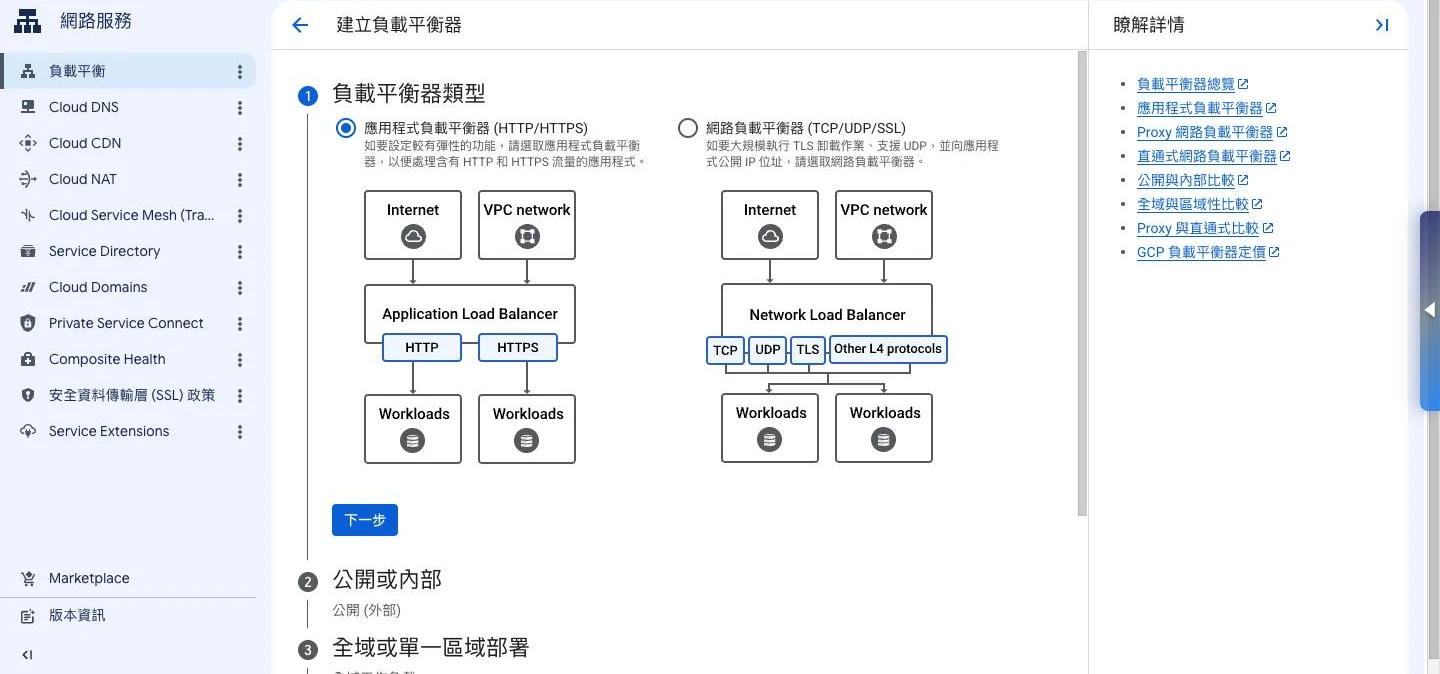
上面那張選型對照表,在 Console 裡其實就濃縮成這三個下拉題:第一步先問你要 L7 的「應用程式」還是 L4 的「網路」(對應 ALB/NLB),第二步問對外還是對內,第三步問全域還是區域。考試的選型題再怎麼包裝,拆開來就是在考這三軸——把題目的關鍵字對到這三個選擇,答案就浮出來了。
GCP 負載均衡全景圖
流程圖暫時無法顯示,請重新整理頁面後再試。
Application Load Balancer(ALB)
全球 vs 區域 ALB
Anycast 是這裡第一個要懂的字:同一個 IP 在全球多個節點同時對外廣播,用戶連上來時會被導到地理上最近的接入點。Global ALB 就是靠這招,用「一個 IP」服務全世界。
| 特性 | Global ALB | Regional ALB |
|---|---|---|
| IP 類型 | Anycast 單一全球 IP | 區域 IP |
| 路由策略 | Google 骨幹網最佳路由 | 嚴格區域路由 |
| 後端範圍 | 跨區域後端 | 單一區域後端 |
| Cloud CDN | ✅ 支援 | ❌ 不支援 |
| Cloud Armor | ✅ 支援 | ✅ 支援 |
| 資料落地 | 可能跨區域 | 嚴格留在區域內 |
| 適合場景 | 全球用戶、高可用 | GDPR 合規、成本最佳化 |
實務上沒有資料落地限制時,多數人直接開 Global ALB,省事又有全球路由;但考試題目只要出現 GDPR、資料不能離開特定區域,答案就要切回 Regional ALB。
ALB 元件架構
一個 ALB 不是單一物件,而是一串元件接起來的。先用一句話搞懂每個元件在幹嘛,後面看 gcloud 六步驟才不會迷路:
- Forwarding Rule(轉發規則)——流量入口,定義對外的 IP + Port。
- Target Proxy(目標代理)——接住連線,HTTPS Proxy 會在這裡處理 SSL 終止。
- URL Map(網址對應)——路由大腦,依 Host + Path 決定這個請求要送去哪個後端。
- Backend Service(後端服務)——一組後端的集合(MIG / NEG / Cloud Run),Cloud Armor、CDN 都掛在這層。
- Health Check(健康檢查)——盯著每個後端的死活,不健康的就不分流量過去。
流程圖暫時無法顯示,請重新整理頁面後再試。
建立 ALB 完整步驟
建立順序是由內而外:先把最裡面的健康檢查、後端做好,再一層層往外接到流量入口。對照上面的架構圖看,這六步分別在組哪個方塊:
| 步驟 | gcloud 指令 | 對應元件 |
|---|---|---|
| 1 | health-checks create | Health Check |
| 2–3 | backend-services | Backend Service |
| 4 | url-maps create | URL Map |
| 5 | target-https-proxies | Target Proxy |
| 6 | forwarding-rules create | Forwarding Rule |
「由內而外」這個順序本身就是考點——因為外層元件都要引用內層(例如 Target Proxy 要指定 URL Map,URL Map 要指定 Backend Service),所以內層一定得先存在。
# 1. 建立健康檢查
gcloud compute health-checks create http my-health-check \
  --port=8080 \
  --request-path=/health \
  --check-interval=10s \
  --timeout=5s \
  --unhealthy-threshold=2 \
  --healthy-threshold=1

# 2. 建立後端服務
gcloud compute backend-services create my-backend \
  --protocol=HTTP \
  --port-name=http \
  --health-checks=my-health-check \
  --global

# 3. 加入後端(Managed Instance Group)
gcloud compute backend-services add-backend my-backend \
  --instance-group=my-mig \
  --instance-group-zone=asia-east1-b \
  --global

# 4. 建立 URL Map(路由規則)
gcloud compute url-maps create my-url-map \
  --default-service=my-backend

# 5. 建立 Target HTTPS Proxy
gcloud compute target-https-proxies create my-https-proxy \
  --url-map=my-url-map \
  --ssl-certificates=my-ssl-cert

# 6. 建立 Forwarding Rule(流量入口)
gcloud compute forwarding-rules create my-forwarding-rule \
  --global \
  --target-https-proxy=my-https-proxy \
  --ports=443
URL Map:路由規則詳解
URL Map 是 ALB 的核心路由邏輯,可以從三個維度做路由:
Path 路由(按路徑)
# 建立含路徑規則的 URL Map
gcloud compute url-maps create my-url-map \
  --default-service=default-backend

# 新增路徑規則
gcloud compute url-maps add-path-rule my-url-map \
  --service=api-backend \
  --path-matcher-name=api-matcher \
  --new-hosts=example.com \
  --paths="/api/*"

gcloud compute url-maps add-path-rule my-url-map \
  --service=static-backend \
  --path-matcher-name=static-matcher \
  --paths="/static/*,/images/*"
example.com/api/users → api-backend
example.com/static/js/* → static-backend(可加 CDN)
example.com/* → default-backendHost 路由(按域名)
# api.example.com → API 後端,www.example.com → Web 後端
gcloud compute url-maps add-host-rule my-url-map \
  --hosts=api.example.com \
  --path-matcher-name=api-matcher
Header 路由(按 Header,2023+)
# YAML 配置範例(適用 A/B 測試)
headerAction:
  requestHeadersToAdd:
    - headerName: X-Backend
      headerValue: canary
routeRules:
  - matchRules:
      - headers:
          - headerName: User-Agent
            regexMatch: .*Mobile.*
    service: mobile-backend
後端類型:Instance Groups vs NEGs
Managed Instance Group(MIG)— 最常見
# 建立 Instance Template
gcloud compute instance-templates create web-template \
  --machine-type=e2-medium \
  --image-family=debian-12 \
  --image-project=debian-cloud \
  --tags=http-server

# 建立 MIG
gcloud compute instance-groups managed create my-mig \
  --template=web-template \
  --size=2 \
  --zone=asia-east1-b

# 設定 Named Port(讓 LB 知道流量走哪個 Port)
gcloud compute instance-groups set-named-ports my-mig \
  --named-ports=http:8080 \
  --zone=asia-east1-b
MIG vs Unmanaged IG:
| 特性 | MIG(托管) | Unmanaged IG |
|---|---|---|
| 自動修復(Auto-healing) | ✅ | ❌ |
| 自動擴縮(Autoscaling) | ✅ | ❌ |
| 滾動更新 | ✅ | 手動 |
| 建議用途 | 生產環境 | 遺留系統、測試 |
ACE 考試:有 Autoscaling 需求 → 一定選 MIG
Network Endpoint Groups(NEGs)
**NEG(Network Endpoint Group,網路端點群組)**跟 Instance Group 不同,它可以直接指到一組 IP:Port、Cloud Run 服務、甚至地端機器,所以後端不一定要是 VM:
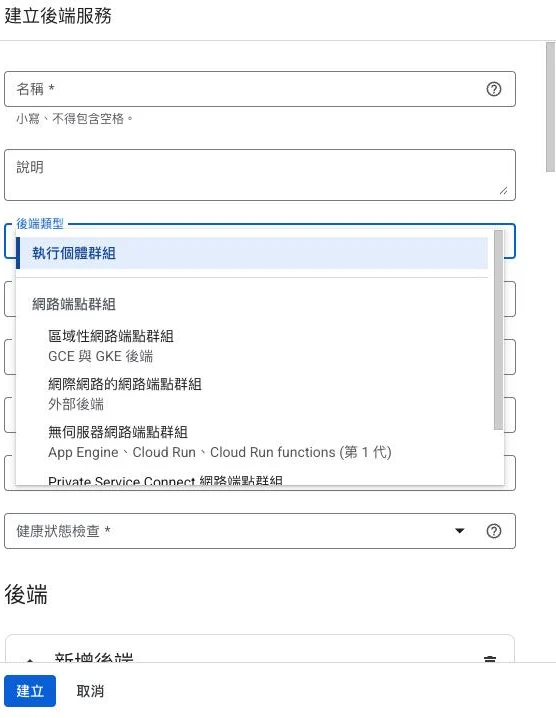
下面那張 NEG 類型表,在 Console 就是這個「後端類型」下拉。重點盯著「無伺服器 NEG」——它是把 Cloud Run/App Engine/Cloud Functions 掛上 ALB 的唯一入口,題目只要提到 Cloud Run 要綁自訂網域、套 CDN 或 Cloud Armor,看到它就對了。反過來,VM 後端要選的是最上面的「執行個體群組」,別跟 NEG 搞混。
| NEG 類型 | 適用後端 | 說明 |
|---|---|---|
| Zonal NEG | Compute Engine VM | 細緻的 IP+Port 層級後端 |
| Internet NEG | 外部 IP 端點 | 對外部服務(on-prem、第三方 API)做 LB |
| Serverless NEG | Cloud Run / App Engine / Cloud Functions | 無伺服器後端的 LB 入口 |
| Private Service Connect NEG | 經 PSC 發佈的已發佈服務 | 私有存取 Google API 或第三方已發佈服務 |
| Hybrid Connectivity NEG | 地端資源(via Cloud Interconnect) | 混合雲整合 |
Serverless NEG — Cloud Run + ALB 整合
題目只要看到 Cloud Run 要綁自訂網域,或要套 Cloud Armor / CDN,答案幾乎都是 Serverless NEG + Global ALB:
# 1. 建立 Serverless NEG(指向 Cloud Run 服務)
gcloud compute network-endpoint-groups create my-run-neg \
  --region=asia-east1 \
  --network-endpoint-type=serverless \
  --cloud-run-service=my-service

# 2. 建立後端服務
gcloud compute backend-services create run-backend \
  --global \
  --load-balancing-scheme=EXTERNAL_MANAGED

# 3. 加入 Serverless NEG
gcloud compute backend-services add-backend run-backend \
  --global \
  --network-endpoint-group=my-run-neg \
--network-endpoint-group-region=asia-east1好處:Cloud Run 接上 ALB 之後,就能多拿到這些:
- 自訂網域 + Google 管理 SSL 憑證
- Cloud CDN 快取靜態資源
- Cloud Armor WAF 防護
SSL/TLS 與 Certificate Manager
Google 管理憑證(自動續期)
# 建立 Google 管理的 SSL 憑證
gcloud compute ssl-certificates create my-cert \
  --domains=www.example.com,api.example.com \
  --global
憑證由 Google 託管的 CA 自動簽發,效期 90 天,到期前約一個月會自動續期。
Certificate Manager(推薦,2025 最佳實踐)
Certificate Manager 把憑證管理收在同一個介面,能應付比較複雜的場景:
# 建立 DNS 授權(用於 wildcard 憑證)
gcloud certificate-manager dns-authorizations create my-dns-auth \
  --domain="example.com"

# 建立憑證(Certificate Manager 管理)
gcloud certificate-manager certificates create my-cert \
  --domains="example.com,*.example.com" \
  --dns-authorizations=my-dns-auth

# 建立 Certificate Map(將憑證映射到負載均衡器)
gcloud certificate-manager maps create my-cert-map

gcloud certificate-manager maps entries create my-cert-entry \
  --map=my-cert-map \
  --certificates=my-cert \
  --hostname="example.com"

# 在 Target Proxy 使用 Certificate Map
gcloud compute target-https-proxies update my-https-proxy \
  --certificate-map=my-cert-map \
  --global
Cloud CDN
Cloud CDN 整合在 Global ALB 上,把靜態資源快取到邊緣節點:
快取模式
| 模式 | 說明 | 適合場景 |
|---|---|---|
CACHE_ALL_STATIC | 自動快取 CSS/JS/圖片等靜態類型 | 一般 Web 應用(預設行為) |
USE_ORIGIN_HEADERS | 遵守 origin 的 Cache-Control / Expires Header | 需要精確控制 TTL |
FORCE_CACHE_ALL | 快取所有回應,包含 HTML | ⚠️ 危險,可能快取動態頁面 |
啟用 Cloud CDN
# 在後端服務上啟用 CDN
gcloud compute backend-services update my-backend \
  --enable-cdn \
  --cache-mode=CACHE_ALL_STATIC \
  --default-ttl=3600 \   # 預設快取 1 小時
  --max-ttl=86400 \      # 最長快取 24 小時
  --global
--default-ttl 只在 CACHE_ALL_STATIC 與 FORCE_CACHE_ALL 模式下有意義;--max-ttl 則在 FORCE_CACHE_ALL 下不能設定(這個模式直接套用 default TTL,不看 origin header)。
快取失效(Cache Invalidation)
# 清除特定路徑的快取
gcloud compute url-maps invalidate-cdn-cache my-url-map \
  --path="/static/*" \
  --global

# 清除全部快取
gcloud compute url-maps invalidate-cdn-cache my-url-map \
  --path="/*" \
  --global
Cache Tags(2024,精細失效)
# Origin 在 HTTP Response Header 設定 Cache-Tag
# Cache-Tag: product-123,category-electronics

# 按 tag 精確失效(不影響其他快取)
gcloud compute url-maps invalidate-cdn-cache my-url-map \
  --tags=product-123 \
  --global
⚠️ 注意:Cloud CDN 只支援 Global External ALB(及 classic ALB),不支援 Regional ALB 或 Internal ALB。
📝 考場提點
ACE 最愛出「哪個組合不合法」的選型題,下面這幾條掛載限制背起來,看到違規組合就能直接刪掉選項:
- Cloud CDN 只能掛在 Global External ALB——選項出現「在 Internal ALB / Regional ALB 上開 CDN」就是錯的。
- Cloud Armor 安全政策掛在 backend service 上,不是直接掛 LB 或 forwarding rule。
- Cloud Armor 規則的優先級:數字越小越優先(rule 1000 先於 rule 2000 被評估),allow/deny 邏輯要照這個順序推。
FORCE_CACHE_ALL會把私有 / 動態內容也快取——題目若提到「使用者個資頁面被別人看到」「動態頁面被誤快取」,凶手通常就是它。
Cloud Armor:WAF 與 DDoS 防護
Cloud Armor 掛在 ALB 前面,一邊幫你擋 L3/L4 的 DDoS,一邊做 L7 的 WAF。實際綁定時,安全政策是掛在 backend service 上的(不是直接掛 LB),這個小細節考試很愛考。
安全政策架構
流程圖暫時無法顯示,請重新整理頁面後再試。
建立安全政策
# 建立安全政策(預設允許所有)
gcloud compute security-policies create my-security-policy \
  --description="Production WAF policy"

# 規則 1:封鎖特定 IP
gcloud compute security-policies rules create 1000 \
  --security-policy=my-security-policy \
  --expression="inIpRange(origin.ip, '192.168.1.0/24')" \
  --action=deny-403 \
  --description="Block internal subnet"

# 規則 2:地區限制(只允許台灣、日本、美國)
gcloud compute security-policies rules create 2000 \
  --security-policy=my-security-policy \
  --expression="origin.region_code != 'TW' && origin.region_code != 'JP' && origin.region_code != 'US'" \
  --action=deny-403 \
  --description="Geo restriction"

# 規則 3:WAF — 防護 XSS
gcloud compute security-policies rules create 3000 \
  --security-policy=my-security-policy \
  --expression="evaluatePreconfiguredExpr('xss-stable')" \
  --action=deny-403 \
  --description="XSS protection"

# 規則 4:WAF — 防護 SQL Injection
gcloud compute security-policies rules create 3001 \
  --security-policy=my-security-policy \
  --expression="evaluatePreconfiguredExpr('sqli-stable')" \
  --action=deny-403

# 規則 5:Rate Limiting(每 IP 每分鐘 100 次)
gcloud compute security-policies rules create 4000 \
  --security-policy=my-security-policy \
  --expression="true" \
  --action=rate-based-ban \
  --rate-limit-threshold-count=100 \
  --rate-limit-threshold-interval-sec=60 \
  --ban-duration-sec=600

# 綁定到後端服務
gcloud compute backend-services update my-backend \
  --security-policy=my-security-policy \
  --global
WAF 預設規則集(Preconfigured Expressions)
| 規則名稱 | 防護類型 |
|---|---|
xss-stable | Cross-Site Scripting |
sqli-stable | SQL Injection |
lfi-stable | Local File Inclusion |
rfi-stable | Remote File Inclusion |
rce-stable | Remote Code Execution |
scannerdetection-stable | 掃描器偵測 |
上面這組裸
-stable名稱現在算 legacy(仍然向後相容、照樣能用,上面 gcloud 範例的evaluatePreconfiguredExpr()寫法也還有效)。官方現行的規則集改用版本化命名,例如sqli-v33-stable、sqli-v422-stable,並搭配evaluatePreconfiguredWaf()函式做更細的調校。考試題目兩種寫法都可能出現,看到版本號不要慌,知道它就是 SQLi/XSS 那一組即可。
健康檢查詳解
健康檢查(Health Check)負責決定哪些後端實例可以收流量:
# HTTP 健康檢查(最常用)
gcloud compute health-checks create http my-hc \
  --port=8080 \
  --request-path=/health \
  --check-interval=10 \    # 每 10 秒檢查一次
  --timeout=5 \            # 5 秒超時
  --unhealthy-threshold=2 \ # 連續 2 次失敗 → 不健康
  --healthy-threshold=1    # 連續 1 次成功 → 健康

# TCP 健康檢查(不支援 HTTP 的服務)
gcloud compute health-checks create tcp my-tcp-hc \
  --port=3306               # 例如 MySQL 代理
健康檢查 vs 後端行為:
- 不健康的後端 → ALB 不再分配流量
- MIG 的自動修復(auto-healing)也使用健康檢查,發現不健康 → 自動替換 VM
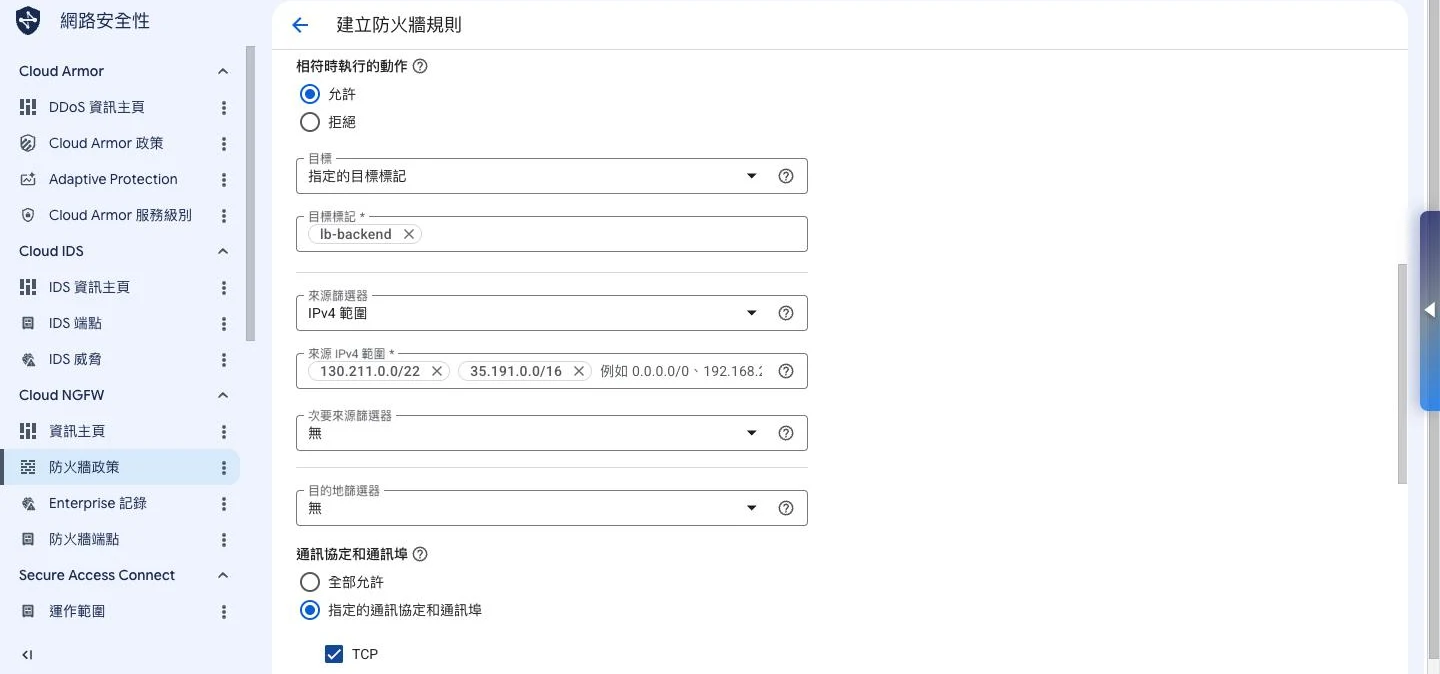
這裡藏著一個超高頻、但正文沒明講的考點:健康檢查的探測封包,全都從 Google 的兩段固定來源 130.211.0.0/22 和 35.191.0.0/16 發出。防火牆若沒替這兩段開路,後端會一直被判成「不健康」、LB 半滴流量都不分——但你的 VM 明明活得好好的。看到題目描述「後端全紅、服務本身卻正常」,先想想是不是漏開了這兩段。
Passthrough Network Load Balancer
Passthrough NLB 直接把封包轉過去,不做 proxy,所以原始來源 IP 會保留下來,而且它永遠是區域級(regional)。除了 TCP/UDP,它還支援 ESP、GRE、ICMP 這類協定,遊戲、VPN、IoT 這種需要看到真實來源 IP 的場景常用到:
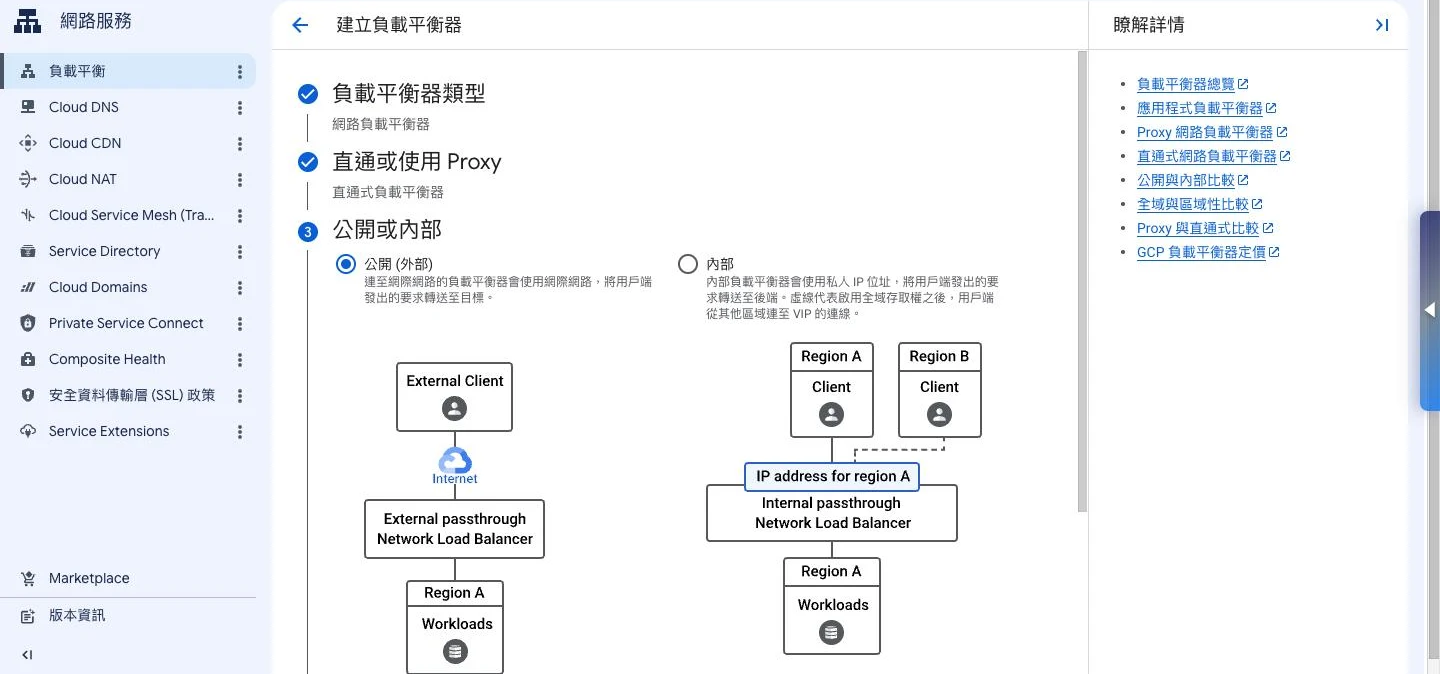
這張圖把「Passthrough 永遠是區域級」講死了:一旦在精靈裡選了直通式,範圍欄位就只剩單一 region 可填,全域選項直接消失。所以考題若同時要求「全球單一 Anycast IP」又「保留原始來源 IP」,這兩個需求其實是互斥的——直通式給不了全域,這時候得改用 Global ALB 再從標頭找真實來源,別硬套 Passthrough。
# 建立 Passthrough NLB 的 Forwarding Rule
gcloud compute forwarding-rules create my-passthrough-nlb \
  --region=asia-east1 \
  --ip-protocol=TCP \
  --ports=80,443 \
  --backend-service=my-backend-service \
  --load-balancing-scheme=EXTERNAL
Passthrough NLB vs TCP Proxy NLB:
| 特性 | Passthrough NLB | TCP Proxy NLB |
|---|---|---|
| 連線方式 | 直通(Direct Server Return) | Proxy |
| 原始 IP | ✅ 保留 | ❌ 看到 LB IP |
| SSL 終止 | ❌(應用程式處理) | ✅ |
| 全球範圍 | ❌ 區域 | ✅ 全球 |
| 適合 | 需要原始 IP(遊戲、IoT) | 一般 TCP 應用 |
多區域高可用架構設計
流程圖暫時無法顯示,請重新整理頁面後再試。
設定多區域後端:
# 加入多個區域的 MIG 作為後端
gcloud compute backend-services add-backend my-backend \
  --instance-group=mig-asia \
  --instance-group-region=asia-east1 \
  --balancing-mode=UTILIZATION \
  --max-utilization=0.8 \
  --global

gcloud compute backend-services add-backend my-backend \
  --instance-group=mig-us \
  --instance-group-region=us-central1 \
  --balancing-mode=UTILIZATION \
  --max-utilization=0.8 \
  --global
Global ALB 會優先把流量導到離用戶最近、而且健康的後端;萬一近端掛了,就自動 failover 到其他區域。
ACE 考試重點整理
選型決策矩陣
| 需求 | 選擇 |
|---|---|
| 全球用戶,L7 HTTP/HTTPS | Global Application LB |
| 區域內用戶,資料合規 | Regional Application LB |
| TCP/UDP,需保留原始 IP | Passthrough Network LB |
| 微服務內部 HTTP 路由 | Internal Application LB |
| 微服務內部 TCP 路由 | Internal Network LB |
| Cloud Run + 自訂域名 + CDN | Global ALB + Serverless NEG |
| 需要 WAF/DDoS 防護 | Cloud Armor(掛在 ALB 上) |
| 靜態資源快取 | Cloud CDN(只支援外部 ALB) |
必背知識點
- 2023 命名變更:HTTP(S) LB → ALB,TCP/UDP LB → NLB
- Global ALB 使用 Anycast IP,Regional ALB 使用區域 IP
- Internal ALB 不支援 Cloud CDN
- MIG 才有 Autoscaling 和 Auto-healing,Unmanaged IG 沒有
- Serverless NEG 是 Cloud Run 整合 ALB 的方式
- Cloud Armor 規則順序:數字越小優先級越高
- FORCE_CACHE_ALL 有風險,會快取動態頁面
常見陷阱題
Q:要對全球用戶提供低延遲服務,需要什麼架構? A:Global ALB + 多區域 MIG。Global ALB 的 Anycast 會將用戶路由到最近的區域。
Q:Cloud CDN 可以用在 Internal ALB 嗎? A:不行。Cloud CDN 只能用在外部(External)ALB。
Q:如何確保後端 VM 被替換時服務不中斷? A:使用 MIG 的 Auto-healing + Health Check,不健康的 VM 自動替換,ALB 在替換期間不發送流量給不健康實例。
Q:如何只允許特定國家的流量?
A:使用 Cloud Armor 建立地區限制規則(origin.region_code)。
Q:ALB 元件建立順序為何? A:Health Check → Backend Service → URL Map → Target Proxy → Forwarding Rule(由內而外)
總結
這課塞了不少東西,但考試真的會反覆考的就這幾塊:
- 命名:2023 年 ALB 取代 HTTP(S) LB,NLB 取代 TCP/UDP LB
- 架構:Forwarding Rule → Target Proxy → URL Map → Backend Service
- 後端:MIG(有 Autoscaling)或 NEG(Serverless NEG 用於 Cloud Run)
- CDN:只支援外部 ALB,三種快取模式
- Cloud Armor:規則優先順序(數字小 = 高優先),WAF 預設規則集
- 多區域 HA:Global ALB + 多區域 MIG 是標準高可用架構
下一課 GCP-110:VPC 進階網路設計,深入探討 Shared VPC、VPC Peering、Cloud NAT 與 Private Google Access。
相關文章
您可能也會對這些文章感興趣

ACE-210:GCP 負載均衡深度解析——ALB、CDN 與 Cloud Armor 完全指南
全面掌握 GCP 負載均衡架構,涵蓋 Application Load Balancer(原 HTTP(S) LB)、Network Load Balancer、NEG 類型、Cloud CDN 快取策略、Cloud Armor WAF,以...

ACE-216:混合雲連線深度解析——Cloud VPN 與 Cloud Interconnect 完全指南
全面掌握 GCP 混合雲連線方案,涵蓋 HA VPN、Classic VPN、Dedicated Interconnect、Partner Interconnect、Cross-Cloud Interconnect、Cloud Router...

ACE-209:Cloud Pub/Sub 與事件驅動架構——解耦微服務的核心技術
深入掌握 Google Cloud Pub/Sub 訊息佇列服務,學習事件驅動架構設計模式、訂閱類型、排序鍵、死信主題、與 Cloud Tasks 和 Eventarc 的選型比較,以及 ACE 考試必考知識點。