Terraform on GCP 實戰:基礎設施即程式碼完全指南
「手動點 Console 建資源,就像用筷子一根一根數米粒——可以做到,但不是正確的方法。」
你已經學過如何用 gcloud 指令和 Console 建立 GCP 資源。但當你的系統從 1 台 VM 長到 50 台、從 1 個環境長到 Dev/Staging/Prod 三個環境,手動管理就會變成惡夢:
- 你還記得那台 VM 的防火牆規則是怎麼設的嗎?
- Staging 和 Production 的設定一致嗎?
- 新同事如何在 5 分鐘內建起一個一模一樣的環境?
**Infrastructure as Code(IaC,基礎設施即程式碼)**就是解決這些問題的答案。而 Terraform 是目前最主流的 IaC 工具。
這篇我會帶你從 IaC 是什麼講起,把 Provider / Resource / State / Module 四個核心搞懂,然後一路做到 GCS 遠端狀態跟一個 VPC + VM + Bucket 的完整範例,最後收尾講 ACE 怎麼考這塊。
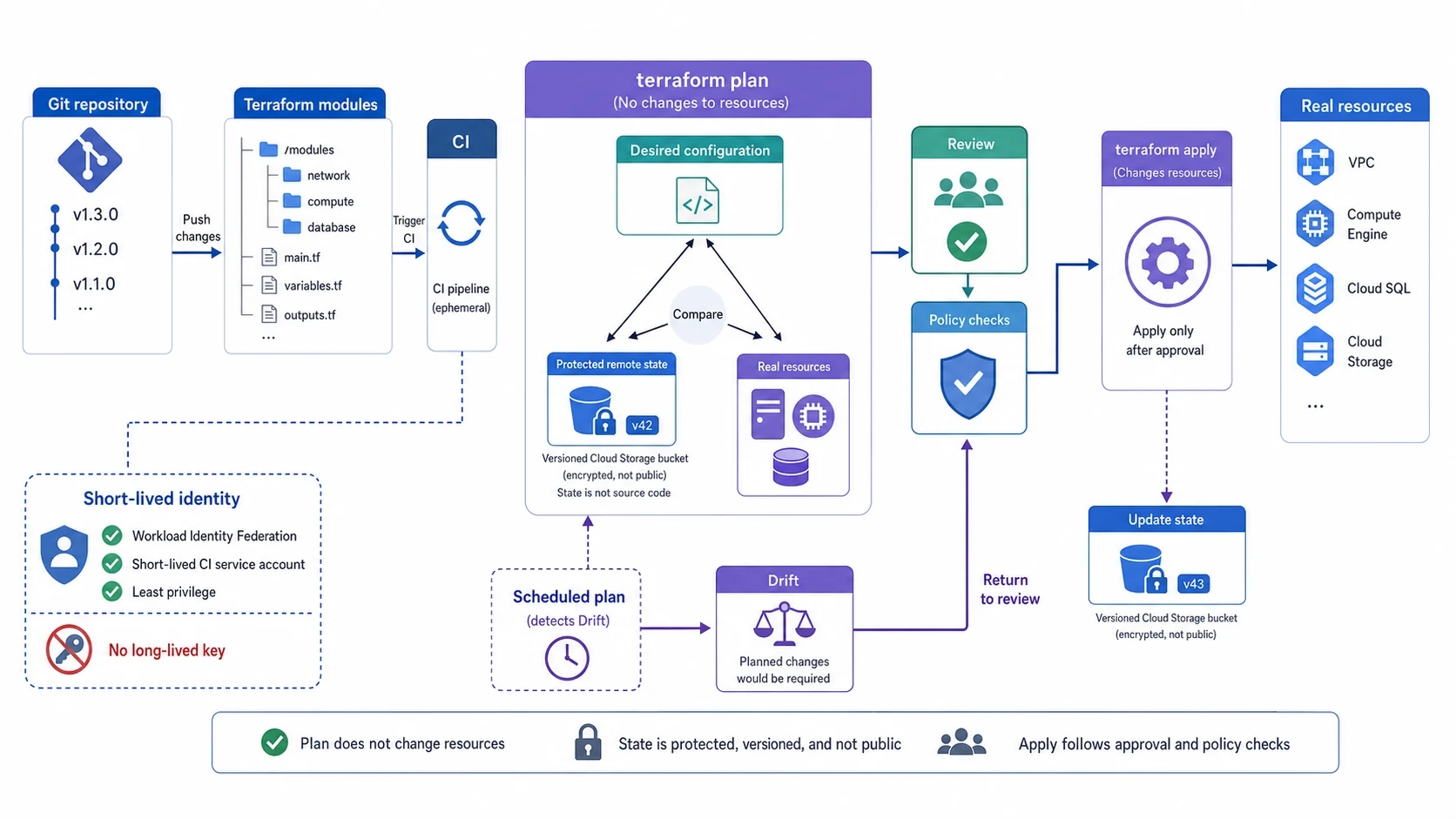
Terraform 的安全迴圈有三份必須比對的事實:版本化設定、受保護的 remote state、實際資源。plan
只產生差異,不改資源;review 與 policy checks 通過後才 apply,再更新同一個 state backend。排程
plan 發現 drift 也要回到審查,而不是自動覆蓋人工變更。
一、為什麼要用 Infrastructure as Code?
1.1 手動管理 vs IaC
| 比較 | 手動(Console/gcloud) | IaC(Terraform) |
|---|---|---|
| 可重複性 | 同一步驟可能有人為誤差 | 每次執行結果完全一致 |
| 版本控制 | 無法追蹤「上週的設定是什麼」 | 放進 Git,完整歷史記錄 |
| 多環境管理 | Dev/Prod 設定可能悄悄不一致 | 用變數控制,結構完全一致 |
| 災難恢復 | 重建環境需要人工重做每個步驟 | 一條指令,從零重建完整環境 |
| Code Review | 無法審查基礎設施變更 | PR 審查,所有變更都可見 |
1.2 Terraform 的核心工作流程
流程圖暫時無法顯示,請重新整理頁面後再試。
二、Terraform 基礎概念
Terraform 用 **HCL(HashiCorp Configuration Language,HashiCorp 設定語言)**這種設定語言來描述你想要的資源——下面所有 .tf 檔裡的程式碼都是 HCL,讀起來像在「填表單」,宣告你要什麼,剩下交給 Terraform。
2.1 Provider(提供者)
Provider 是 Terraform 跟雲端平台之間的橋樑,負責告訴 Terraform 怎麼跟 GCP API 溝通。
# main.tf

terraform {
  required_providers {
    google = {
      source  = "hashicorp/google"
      version = "~> 7.0"  # 鎖定 7.x 主版本(撰文時最新;最新版請查 Registry)
    }
  }
}

provider "google" {
  project = "my-gcp-project"
  region  = "asia-east1"
}版本鎖定說明:
~> 7.0:允許 7.0.x 到 7.x.x 的任何版本,但不包含 8.0.0- 這樣可以自動獲得修正版本(7.1、7.2)但不會意外升到有破壞性變更的主版本
- hashicorp/google provider 的主版本大約一年一更,撰文時最新是 7.x。實際開新專案前,建議去 Terraform Registry 確認當下的最新主版本,把
~> 7.0換成對應數字
2.2 Resource(資源)
Resource 代表你要在 GCP 上建立的實際物件:
# 建立一個 VPC
resource "google_compute_network" "main" {
  name                    = "my-vpc"
  auto_create_subnetworks = false  # Custom Mode
}

# 建立一個 Subnet
resource "google_compute_subnetwork" "main" {
  name          = "asia-east1-subnet"
  ip_cidr_range = "10.1.0.0/24"
  region        = "asia-east1"
  network       = google_compute_network.main.id  # 引用上面的 VPC
}

# 建立一個 VM
resource "google_compute_instance" "web" {
  name         = "web-server"
  machine_type = "e2-micro"
  zone         = "asia-east1-a"

  boot_disk {
    initialize_params {
      image = "debian-cloud/debian-12"  # Debian 12 Bookworm(LTS,Debian 13 Trixie 已是現行穩定版,12 仍受長期支援)
    }
  }

  network_interface {
    subnetwork = google_compute_subnetwork.main.id
    access_config {
      # 空區塊 = 分配外部 IP;移除這個區塊 = 只有內部 IP
    }
  }

  tags = ["web-server"]
}
Resource 引用語法:TYPE.NAME.ATTRIBUTE
google_compute_network.main.id代表「名為 main 的 google_compute_network 資源的 id 屬性」- Terraform 會自動建立依賴關係,先建立 VPC,再建立 Subnet
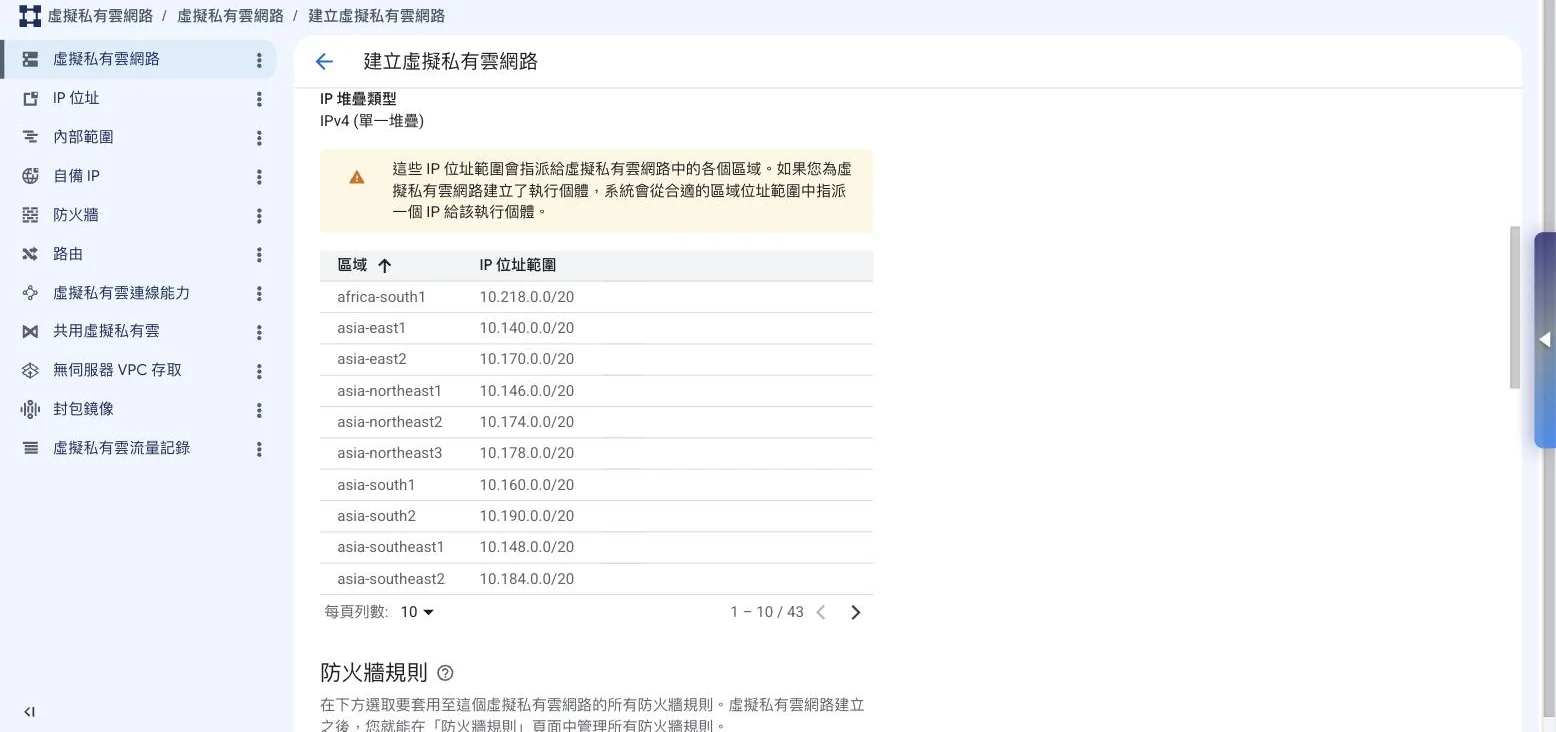
這是 Console 開 VPC 時選「自動模式」的長相——GCP 一口氣在每個 region(撰文時 43 個)各塞一個固定
/20 子網路,省事,但網段全由它決定。上面程式碼那行
auto_create_subnetworks = false 做的,就是把這整張表關掉、改走 Custom
Mode,子網路自己一格一格畫。ACE 很愛考這組對比:預設的 default
網路是自動模式,正式環境幾乎都改用自訂模式,好把 CIDR 網段抓在自己手裡。
2.3 Variables(變數)
把設定抽成變數,讓同一份程式碼可以部署到不同環境:
# variables.tf

variable "project_id" {
  description = "GCP Project ID"
  type        = string
}

variable "environment" {
  description = "Environment name (dev/staging/prod)"
  type        = string
  default     = "dev"
}

variable "region" {
  description = "GCP Region"
  type        = string
  default     = "asia-east1"
}

variable "vm_count" {
  description = "Number of VM instances"
  type        = number
  default     = 1
}
# main.tf 中使用變數
resource "google_compute_instance" "web" {
name = "${var.environment}-web-server" # dev-web-server 或 prod-web-server
machine_type = var.environment == "prod" ? "e2-standard-2" : "e2-micro"
zone = "${var.region}-a"
# ...
}# terraform.tfvars(給變數指定值)
project_id = "my-gcp-project-123"
environment = "prod"
region = "asia-east1"2.4 Outputs(輸出)
Outputs 讓你可以取出 Terraform 建立的資源的重要資訊:
# outputs.tf

output "vm_external_ip" {
  description = "External IP of the web server"
  value       = google_compute_instance.web.network_interface[0].access_config[0].nat_ip
}

output "vpc_id" {
  description = "VPC ID"
  value       = google_compute_network.main.id
}
執行 terraform apply 後,會顯示:
Outputs:

vm_external_ip = "34.80.XXX.XXX"
vpc_id = "projects/my-project/global/networks/my-vpc"
2.5 Data Sources(資料來源)
Data Source 讓你引用已經存在的 GCP 資源(不由 Terraform 管理的):
# 引用現有的 VPC(不重新建立)
data "google_compute_network" "existing_vpc" {
  name = "default"
}

# 引用現有的 Service Account
data "google_service_account" "existing_sa" {
  account_id = "my-existing-sa"
}

# 在 resource 中使用 data source
resource "google_compute_instance" "web" {
  # ...
  network_interface {
    network = data.google_compute_network.existing_vpc.id
  }
}
2.6 State File(狀態檔)
State File(terraform.tfstate)是 Terraform 最重要也最需要保護的檔案。
它記錄什麼:
{
  "resources": [
    {
      "type": "google_compute_instance",
      "name": "web",
      "instances": [
        {
          "attributes": {
            "id": "projects/my-project/zones/asia-east1-a/instances/web-server",
            "name": "web-server",
            "machine_type": "e2-micro"
            // ... 所有屬性
          }
        }
      ]
    }
  ]
}為什麼重要:
- Terraform 靠 State File 知道「GCP 上的哪些資源是我管的」
- 比對 State File 和
.tf設定,計算出需要建立/修改/刪除什麼 - 如果 State File 丟失,Terraform 就「失憶」了,會嘗試重新建立所有資源
流程圖暫時無法顯示,請重新整理頁面後再試。
⚠️ 絕對不要把 State File 放進 git! 它可能包含敏感資訊(密碼、憑證)。
單機自己用,這個檔放本地沒問題;但一旦進到團隊協作,就得把它搬到大家共用的遠端位置——第四章會講怎麼搬到 GCS。
三、在 GCP 上認證 Terraform
3.1 本地開發:Application Default Credentials
最簡單也最安全的本地開發認證方式:
# 設定 Application Default Credentials
gcloud auth application-default login

# 登入後,Terraform 會自動使用你的帳號身分
terraform plan
terraform apply
# Provider 不需要指定 credentials,ADC 會自動處理
provider "google" {
project = var.project_id
region = var.region
}3.2 CI/CD 環境:Service Account Impersonation
生產環境的 CI/CD(GitHub Actions、Cloud Build 等)推薦使用 Service Account Impersonation,不需要下載 JSON 金鑰:
provider "google" {
  project = var.project_id
  region  = var.region

  # Impersonate 一個具有所需權限的 Service Account
  impersonate_service_account = "terraform-runner@my-project.iam.gserviceaccount.com"
}
# 設定:讓 CI/CD 的 SA 有權限 impersonate terraform-runner SA
gcloud iam service-accounts add-iam-policy-binding \
terraform-runner@my-project.iam.gserviceaccount.com \
--member="serviceAccount:ci-cd@my-project.iam.gserviceaccount.com" \
--role="roles/iam.serviceAccountTokenCreator"四、GCS 遠端狀態設定(Team 協作必備)
本地 State File 自己一個人用還行,但只要進到團隊協作,State File 就得放到一個大家共用的遠端位置。
4.1 為什麼需要遠端狀態?
| 問題 | 本地 State | GCS Remote State |
|---|---|---|
兩人同時執行 apply | 狀態衝突,資源損毀 | 自動加鎖,防止並發 |
| 換電腦後找不到 State | 狀態丟失 | 永久存在 GCS |
| 需要 Code Review 狀態 | 無法審查 | 版本歷史可追蹤 |
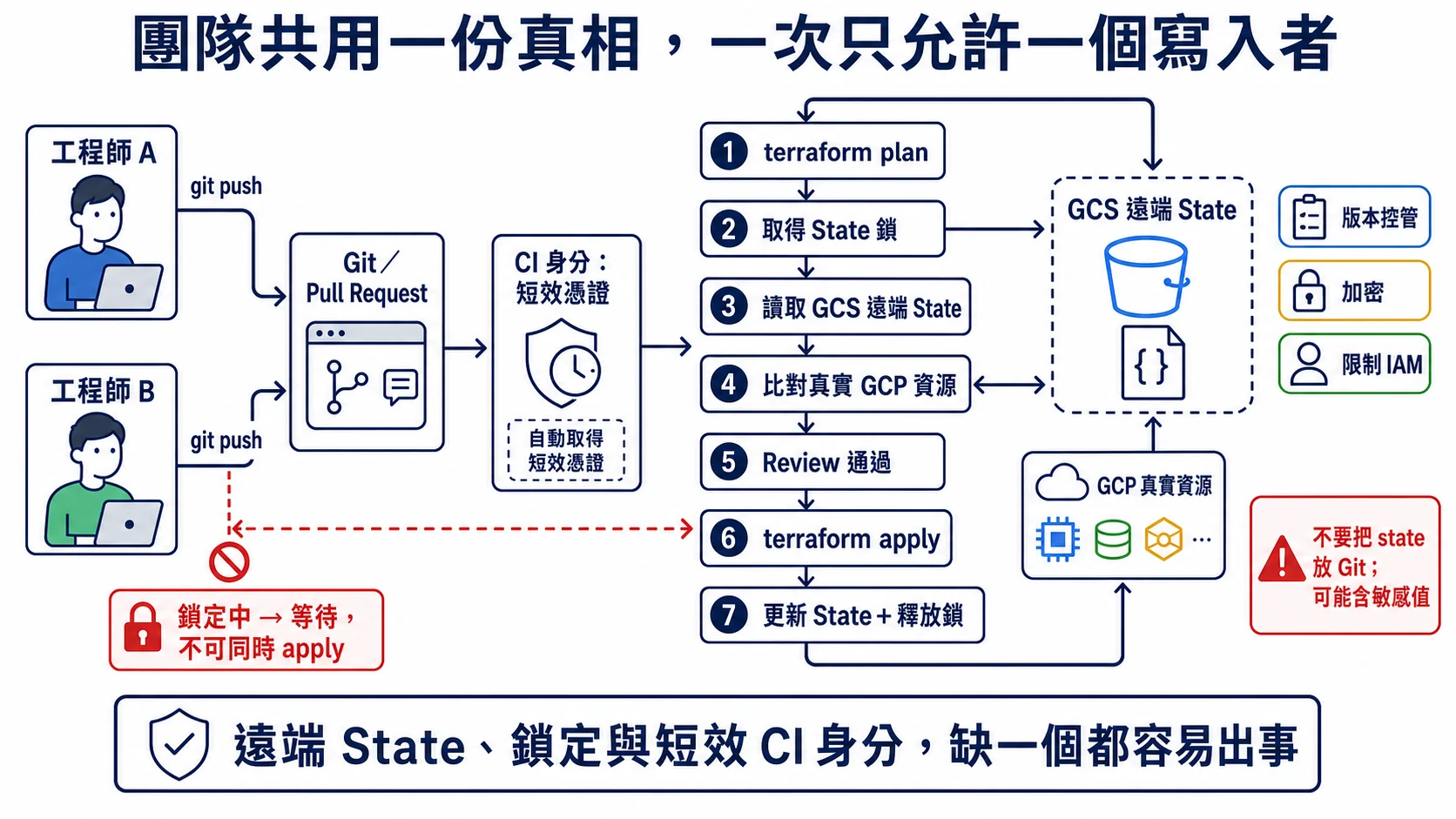
團隊要共用的是受保護的遠端 State,而不是把 state 檔提交進 Git。執行者先取得鎖,再讀取 State、比對真實資源並通過 Review;同時間的另一個 apply 必須等待,完成後才更新 State 並釋放鎖。
4.2 設定 GCS 作為 Backend
# Step 1: 建立用來存放 State 的 GCS Bucket(使用 gcloud storage,取代舊版 gsutil)
gcloud storage buckets create gs://my-terraform-state-bucket --location=asia-east1
gcloud storage buckets update gs://my-terraform-state-bucket --versioning  # 啟用版本控制(重要!)
# terraform.tf(或 main.tf 開頭)
terraform {
backend "gcs" {
bucket = "my-terraform-state-bucket" # 你剛建立的 Bucket
prefix = "terraform/state" # State File 的路徑前綴
}
required_providers {
google = {
source = "hashicorp/google"
version = "~> 7.0"
}
}
}# Step 2: 初始化(會把本地 State 遷移到 GCS)
terraform init
# 看到這個訊息代表成功:
# Initializing the backend...
# Successfully configured the backend "gcs"!GCS Backend 的優勢:
- 自動 State 鎖定:當有人在執行
apply,GCS 會自動加鎖,其他人無法同時操作 - 無需 DynamoDB:不像 AWS S3 Backend 需要額外的 DynamoDB 鎖定表,GCS 內建鎖定功能
- 版本歷史:啟用 GCS 版本控制後,每個 State 變更都有歷史記錄
五、完整實戰範例:VPC + VM + Cloud Storage
下面是一個完整的 Terraform 配置範例,幫你建起一個基本的 GCP 環境:
project/
├── main.tf        # 主要資源定義
├── variables.tf   # 變數定義
├── outputs.tf     # 輸出定義
├── terraform.tf   # 版本和 Backend 設定
└── terraform.tfvars  # 實際值(不放進 git)
terraform.tf
terraform {
  backend "gcs" {
    bucket = "my-terraform-state-bucket"
    prefix = "env/prod"
  }

  required_providers {
    google = {
      source  = "hashicorp/google"
      version = "~> 7.0"
    }
  }
}

provider "google" {
  project = var.project_id
  region  = var.region
}
variables.tf
variable "project_id" {
  description = "GCP Project ID"
  type        = string
}

variable "region" {
  description = "GCP Region"
  type        = string
  default     = "asia-east1"
}

variable "environment" {
  description = "Environment (dev/staging/prod)"
  type        = string
  default     = "dev"
}
main.tf
# ===== Networking =====

resource "google_compute_network" "vpc" {
  name                    = "${var.environment}-vpc"
  auto_create_subnetworks = false
}

resource "google_compute_subnetwork" "subnet" {
  name          = "${var.environment}-subnet-${var.region}"
  ip_cidr_range = "10.1.0.0/24"
  region        = var.region
  network       = google_compute_network.vpc.id
}

# 防火牆:允許 IAP SSH
resource "google_compute_firewall" "allow_iap_ssh" {
  name    = "${var.environment}-allow-iap-ssh"
  network = google_compute_network.vpc.name

  allow {
    protocol = "tcp"
    ports    = ["22"]
  }

  source_ranges = ["35.235.240.0/20"]  # IAP IP 範圍
  target_tags   = ["iap-ssh"]
}

# ===== Compute =====

resource "google_service_account" "vm_sa" {
  account_id   = "${var.environment}-vm-sa"
  display_name = "${var.environment} VM Service Account"
}

resource "google_compute_instance" "web" {
  name         = "${var.environment}-web-server"
  machine_type = var.environment == "prod" ? "e2-small" : "e2-micro"
  zone         = "${var.region}-a"

  boot_disk {
    initialize_params {
      image = "debian-cloud/debian-12"
      size  = 20  # GB
    }
  }

  network_interface {
    subnetwork = google_compute_subnetwork.subnet.id
    # 沒有 access_config = 無外部 IP(搭配 IAP 使用)
  }

  service_account {
    email  = google_service_account.vm_sa.email
    scopes = ["https://www.googleapis.com/auth/cloud-platform"]
  }

  tags = ["iap-ssh"]

  metadata = {
    enable-oslogin = "TRUE"
  }
}

# ===== Storage =====

resource "google_storage_bucket" "app_data" {
  name          = "${var.project_id}-${var.environment}-app-data"
  location      = "ASIA-EAST1"
  force_destroy = var.environment != "prod"  # prod 環境不允許意外刪除

  versioning {
    enabled = true
  }

  lifecycle_rule {
    condition {
      age = 30  # 30 天後移到 Coldline
    }
    action {
      type          = "SetStorageClass"
      storage_class = "COLDLINE"
    }
  }
}

# 授予 VM SA 讀取 Bucket 的權限
resource "google_storage_bucket_iam_member" "vm_reader" {
  bucket = google_storage_bucket.app_data.name
  role   = "roles/storage.objectViewer"
  member = "serviceAccount:${google_service_account.vm_sa.email}"
}
outputs.tf
output "vm_instance_name" {
  description = "VM instance name"
  value       = google_compute_instance.web.name
}

output "vpc_name" {
  description = "VPC name"
  value       = google_compute_network.vpc.name
}

output "bucket_name" {
  description = "Cloud Storage bucket name"
  value       = google_storage_bucket.app_data.name
}
terraform.tfvars(不放進 git)
project_id  = "my-gcp-project-123456"
region      = "asia-east1"
environment = "dev"
執行 Terraform
# 初始化(下載 provider、設定 backend)
terraform init

# 格式化程式碼(建議每次 commit 前執行)
terraform fmt

# 驗證語法
terraform validate

# 預覽即將發生的變更
terraform plan

# 套用變更(建立資源)
terraform apply

# 查看 state 中的所有資源
terraform state list

# 銷毀所有資源(謹慎!)
terraform destroy
六、Terraform Modules:可重用的程式碼單元
Module 就是 Terraform 裡的「函數」,把常用的資源組合打包起來,之後就能重複拿來用:
modules/
└── network/
    ├── main.tf        # VPC + Subnet + Firewall 的定義
    ├── variables.tf   # 模組接受的參數
    └── outputs.tf     # 模組提供的輸出
# 使用模組(在根目錄的 main.tf 中)
module "network" {
source = "./modules/network"
project_id = var.project_id
region = var.region
environment = var.environment
cidr_range = "10.1.0.0/24"
}
# 使用模組的輸出
resource "google_compute_instance" "web" {
# ...
network_interface {
subnetwork = module.network.subnet_id # 引用模組的輸出
}
}流程圖暫時無法顯示,請重新整理頁面後再試。
公開模組:Terraform Registry 上有 Google 官方維護的 GCP 模組,VPC、GKE、Cloud SQL 都有,直接拿來引用,開發會省事很多。
七、Terraform vs 其他 IaC 工具
| 工具 | 現狀 | 適用場景 |
|---|---|---|
| Terraform | ✅ 業界標準(BSL 授權) | 多雲環境、大多數 GCP 場景 |
| OpenTofu | ✅ 開源替代方案(MPL 2.0) | 需要真正開源授權的組織 |
| Deployment Manager | 🔴 已於 2026/03/31 結束支援 | 遷移至 Terraform 或 Infra Manager |
| Config Connector | ✅ 活躍維護 | Kubernetes-native GCP 管理 |
| Infra Manager | ✅ Google 新推出 | 基於 Terraform 的 GCP 託管服務 |
Terraform vs OpenTofu
2023 年 8 月,HashiCorp 將 Terraform 的授權從 MPL 2.0 改為 Business Source License(BSL),限制了商業競爭者的使用。社群因此 fork 出 OpenTofu,由 Linux Foundation 管理,維持 MPL 2.0 授權。
對你的影響:
- 個人學習和內部使用:兩者都可以,無任何限制
- 企業內部部署:通常也不受 BSL 影響
- 嵌入產品銷售:需要留意 BSL 授權條款,OpenTofu 是較安全的選擇
技術上:OpenTofu 和 Terraform 的 HCL 語法幾乎完全相容,要切換幾乎沒什麼成本。
Deployment Manager 注意事項
🔴 已停止支援:Cloud Deployment Manager 已於 2026 年 3 月 31 日結束支援,現在不能再用這個服務建立或管理資源(既有資源仍會繼續運作)。如果你還有遺留的 Deployment Manager 設定,盡快遷移。
Google 提供了 dm-convert 工具協助遷移到 Terraform,替代方案是 Cloud Infrastructure Manager(基於 Terraform 的 GCP 託管服務)。
八、Terraform 最佳實踐
✅ 必做
| 實踐 | 說明 |
|---|---|
| State 存 GCS | 永遠使用遠端 State,不要本地 |
| 版本鎖定 | Provider 版本用 ~> X.0 鎖定主版本 |
| terraform fmt | 每次 commit 前格式化程式碼 |
| terraform validate | 確認語法正確再 plan/apply |
| Commit 前 plan | 先 plan 確認變更符合預期 |
| 模組化 | 複雜資源組合抽成 Module |
| 變數化 | 環境相關值用變數,不寫死 |
| 描述所有變數 | description 欄位一定要填 |
❌ 禁止
| 禁止事項 | 原因 |
|---|---|
| 把 .tfstate 放進 git | 可能包含密碼、API 金鑰 |
| 把 .tfvars 放進 git | 包含實際的專案 ID、密碼 |
| 硬寫 credentials | 安全風險,用 ADC 或 Impersonation |
| 手動修改 GCP Console 後不更新 .tf | 造成 Drift,Terraform 下次 apply 可能覆蓋 |
| 直接修改 tfstate | 高風險操作,容易造成狀態損毀 |
九、常見問題 FAQ
Q: terraform apply 後我在 Console 手動改了設定,下次 apply 會發生什麼?
Terraform 會偵測到 State Drift——實際的 GCP 狀態跟你 .tf 裡寫的定義對不上,這個落差就叫 drift(漂移)——並在下次 apply 時覆蓋你的手動修改。
解決方法:
- 把手動修改也更新到
.tf文件中 - 或者執行
terraform apply -refresh-only,先檢視 GCP 實際狀態與 state 的差異再決定要不要同步(舊版terraform refresh會不經審查直接改 state,自 Terraform 0.15.4 起已不建議使用)
流程圖暫時無法顯示,請重新整理頁面後再試。
Q: 如何管理多個環境(Dev/Staging/Prod)?
兩種主流做法:
方法 1:Terraform Workspaces
# 建立不同環境的 Workspace
terraform workspace new dev
terraform workspace new prod

# 切換到 prod
terraform workspace select prod
terraform apply -var-file=prod.tfvars
方法 2:獨立目錄(推薦)
environments/
├── dev/
│   ├── main.tf
│   └── terraform.tfvars
└── prod/
    ├── main.tf
    └── terraform.tfvars
每個環境有獨立的 State,降低誤操作風險。
Q: terraform destroy 很危險,如何防止誤刪生產資源?
在重要資源上加入保護機制:
resource "google_sql_database_instance" "main" {
  # ...
  deletion_protection = true  # 啟用後需先設為 false 才能 destroy
}

resource "google_storage_bucket" "critical" {
  # ...
  force_destroy = false  # Bucket 非空時無法刪除
}
十、ACE 考試重點
IaC 是 ACE 考試中「自動化與工具」域的重點主題:
類型 1:工具選擇
題目:你需要用程式碼管理 GCP 基礎設施,且同時也要管理 AWS 資源。最適合的工具是?
- ❌ Cloud Deployment Manager(只支援 GCP)
- ❌ Config Connector(需要 Kubernetes 環境)
- ✅ Terraform(多雲支援)
類型 2:State 管理
題目:你的團隊有 5 位工程師都需要執行 Terraform。如何確保 State 的一致性?
- ❌ 把 terraform.tfstate 放進 git 的私有 Repo
- ✅ 使用 GCS 作為 Terraform Remote Backend(內建 State 鎖定)
📝 考場提點
State 管理是這塊最愛考的點。題目只要出現 multiple engineers / a team / state consistency 這類字眼,答案幾乎都是「把 state 放 GCS remote backend」,因為它內建鎖定,能擋掉兩個人同時
apply把狀態寫壞。兩個常見陷阱要記牢:(1) 看到「放進 git(哪怕是 private repo)」一律是錯的——state 含敏感資訊,而且 git 不會幫你上鎖。(2) 看到選項提到要另外搞一張 DynamoDB 鎖定表——那是 AWS S3 backend 的做法,GCS backend 不需要,這是混淆 GCP 與 AWS 的經典誘答。
類型 3:認證方式
題目:在 Cloud Build 中執行 Terraform,最安全的認證方式是?
- ❌ 下載 Service Account JSON 金鑰,存為 Secret
- ✅ 使用 Service Account Impersonation(透過 Cloud Build 的 SA Impersonate terraform-runner SA)
📝 考場提點
工具選型題看關鍵字對號入座:跨雲 / multi-cloud(GCP 又要管 AWS)→ Terraform;只在 GCP 又想要託管服務 → Infra Manager(底層也是 Terraform);Kubernetes-native、想用 K8s CRD 管 GCP 資源 → Config Connector。看到 Deployment Manager 直接刪——它 2026/3/31 已結束支援,正確答案不可能是它。
認證題的鐵則:能不下載 JSON key 就不要下載。安全程度由高到低依序是 Workload Identity / Service Account Impersonation / ADC(本地開發)> 下載 JSON 金鑰。看到 CI/CD(Cloud Build、GitHub Actions)裡「最安全」這個字,選 Impersonation 或 Workload Identity,凡是「下載並存放 JSON 金鑰」的選項都是誘答。
類型 4:核心指令
題目:執行 terraform plan 的目的是?
- ✅ 預覽 Terraform 即將建立/修改/刪除的資源,不實際執行任何操作
十一、總結
Terraform 四大核心:
| 概念 | 說明 |
|---|---|
| Provider | 定義與 GCP 的連線方式,鎖定 ~> 7.0 |
| Resource | 你要建立的 GCP 資源(VM、VPC、Bucket) |
| State | Terraform 的「記憶」,存放在 GCS |
| Module | 可重用的資源組合,減少重複程式碼 |
核心工作流程:
terraform init     # 初始化
terraform fmt      # 格式化
terraform validate # 驗證
terraform plan     # 預覽
terraform apply # 套用最重要的安全原則:
- State File 存 GCS(加上 versioning),不放 git
- 使用 ADC 或 Impersonation,不用 JSON 金鑰
- 生產資源啟用
deletion_protection = true
系列文章連結
- 📖 上一篇:ACE-206: GKE 入門:在 Google Kubernetes Engine 上部署容器應用
- 📖 相關閱讀:GCP-105: GCP IAM 完全指南
- 📖 進階延伸:ACE-301: 企業上雲遷移完全指南
延伸閱讀
- GCP Terraform 官方文件
- Terraform GCP Provider 文件
- GCS Backend 設定
- GCP Terraform 最佳實踐
- Terraform Google Modules(官方模組庫)
- OpenTofu 官方網站
- Cloud Infrastructure Manager
🎓 本文是「GCP 精通之路」系列的 ACE-207 篇(進階篇),掌握 Terraform on GCP 後,建議繼續學習企業上雲遷移策略。
下一課 GCP-107:Cloud Storage 完全指南,學習 GCP 物件儲存從入門到實戰。
相關文章
您可能也會對這些文章感興趣
Terraform on GCP 實戰:基礎設施即程式碼完全指南
從零開始掌握 Terraform on GCP:核心概念(Provider/Resource/State/Module)、GCS 遠端狀態設定、Application Default Credentials 認證、Compute Engin...
ACE-215:GCP 基礎架構即代碼(IaC)策略——Terraform、Infrastructure Manager 與 Config Connector 完全指南
全面掌握 GCP 的 Infrastructure as Code 策略,涵蓋 Terraform HCL、GCP Infrastructure Manager(託管 Terraform)、Config Connector(K8s 原生)、...
GKE 入門:在 Google Kubernetes Engine 上部署容器應用
從容器基礎到 GKE 實戰:Standard vs Autopilot 選型比較、核心 Kubernetes 概念(Pod/Deployment/Service/Ingress)、Horizontal Pod Autoscaler 自動擴縮...